
news
New features in TTS Corporate are now available
We know many of you have been keen on seeing the new features we developed in TTS Corporate, so here they are, we hope you enjoy them!
Rent-a-Car search and booking
Rent-a-Car comes with a great suit of filters as well as the following companion features to allow you and your clients to set the car booking environment according to your needs:
- Rent-a-Car Fees enables you to define the fees to apply to rent-a-car bookings;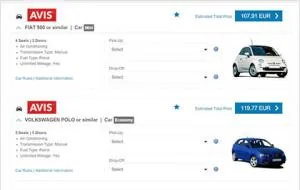
- Rent-a-Car Travel Policies allow your companies to add their own rent-a-car booking rules;
- Rent-a-Car Preferences lets you and your companies set preferred and blacklisted suppliers;
To set Rent-a-Car Preferences and Rent-a-Car Fees go to Settings on the main menu and to add rent-a-car rules to your company’s Travel Policies just create/edit a travel policy and scroll down until you find the rent-a-car rules section.
Air Private Fares
Include Air Private Fares in your clients’ search results and generally or per company: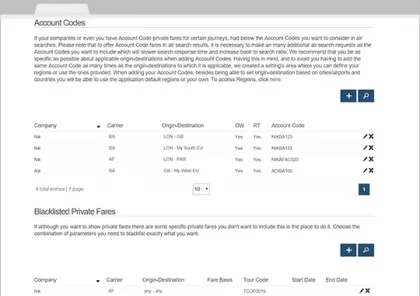
- define the type of Air Private Fares you wish to include: Airline, Agency Selling and Net fares; - add Account Codes to include your clients’ specific negotiated fares in their air search results; - blacklist the air private fares you want to exclude from your client’s air search results based on a combination of (all or just some of the following parameters) Carrier, Origin/Destination, Fare Basis, and Tour Code.
Air Private Fares is only available for companies with the Premium plan. You can set Air Private Fares for companies in the Free plan but Air Private Fares will only be included in their air search results when you upgrade those companies’ pricing plans to Premium.
To set Air Private Fares, go to Settings on the main menu.
Regions
A region can be a set of countries or cities/airports that you can use to ease the setup of Air Private Fares. Regions can be used to easily specify account codes for journey coverage or to blacklist certain air private fares for specific journey searches.
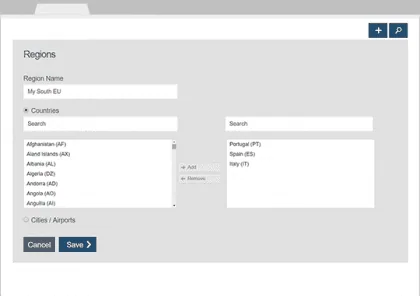
If you have a private fare which Fare Basis and/or Tour Code are associated with several origin-destinations, let’s say all Europe, and you don’t want that air private fare appearing for South European searches, you can create your South Europe region and add the countries you want to that region, then when setting up the blacklisted private fares, you can use that region to specify origin and/or destination of the air private fare you wish to blacklist.
That’s one of the examples where regions can do the trick.
Pssst, one more thing… Regions will be used in the future to offer more customization to other areas without bringing additional complexity.
To access Regions, go to Settings on the main menu.
Offline Requests
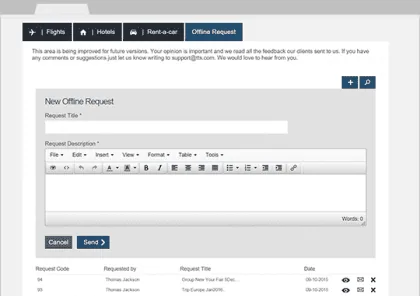
Allow your clients to ask for more complex travel journeys or additional services in a way that lets both parties track all the requests made:
- create, view, and delete requests; - access the requests list; - Search among requests.
Offline requests are available at “Search and Book”.
Control the services you offer online
Decide per company what services they can
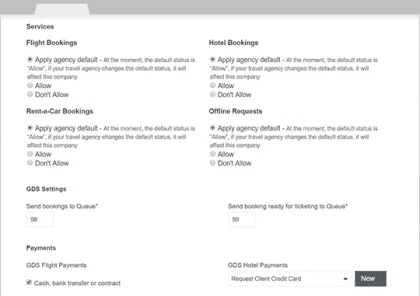
use, for instance only allowing Flight and Rent-a-Car bookings for a specific company and other combinations of services for other companies:
- setup at My Agency page your default logic for online services; - and follow or override per company, your agency’s services default settings.
We are already adding content to the TTS Corporate Support Center and there is no stopping now, so we invite you to share with us what you would like to see there first, so we can continue to work on growing it by giving priority to what is more relevant to you all. The Support Center is available here and can be accessed also via TTS Corporate through the Support link available in the main menu.
Give it a try and let us know what you think! And as always, if you’ve got any questions or doubts let us know via support@tts.com.